Topic · slides · link
Let AI run your live polls — from topic to insight
TapInFlow is an AI-powered live polling tool for workshops, classrooms, and all-hands meetings. Type a topic and AI drafts contextual poll questions round by round — then run the whole session live, right from your browser.
Built for trainers, teachers, founders, speakers, and hosts running live sessions. No app for your audience. Five-minute setup, AI insight report the moment you finish.
or paste a link · PPT · PDF · Word · HTML · MD · TXT
AI is generating questions tailored to your topic & content
What had the biggest impact on the team this quarter?
- Shipping the new release
- Process & workflow changes
- New hires & ramp-up
In one word, how did Q2 feel?
How sustainable was our pace this quarter?
One thing we should change in Q3?
Starting the live session…
Try it · no signup
Feel a live poll before you sign up
Pick a topic to see a pre-drafted sample poll, then vote the way your audience would.
Pick a topic above to see a sample poll
Introducing TapInFlow
A quick intro — what we built and why.
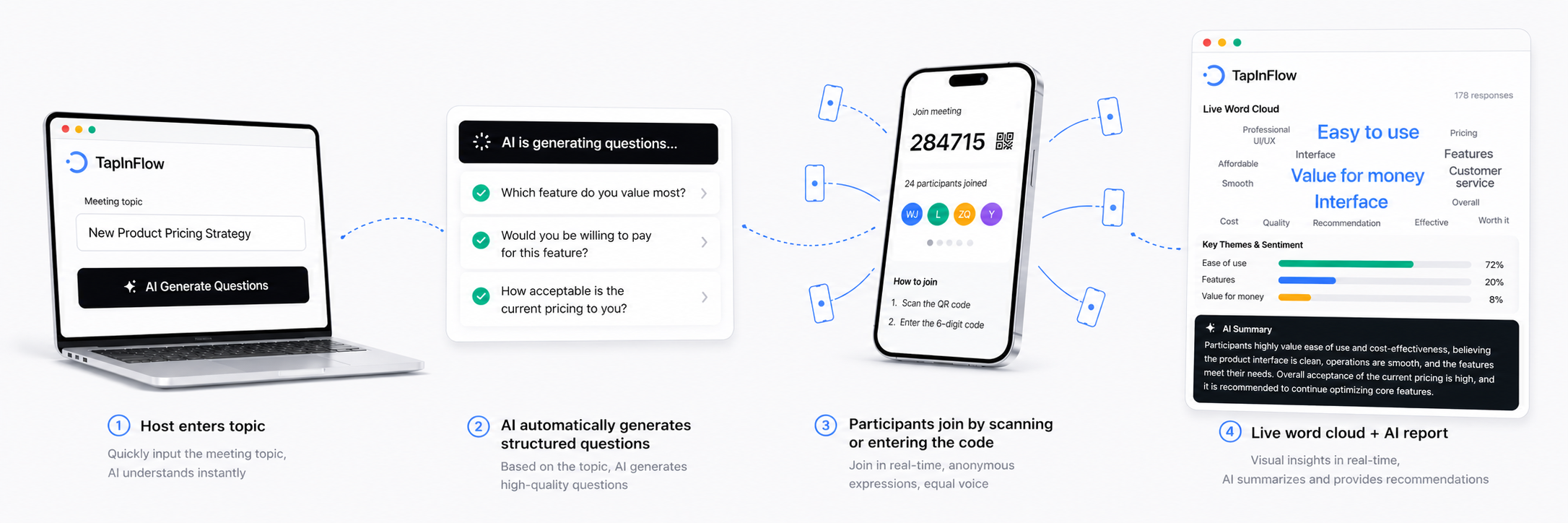
Up and running in minutes
From topic to insight report — four steps, five minutes.
AI-powered, three core capabilities
Everything you need to engage and learn from your audience.
Go beyond charts — every session ends with an AI insight report
Question AI insight
Themes and sentiment form as answers arrive — adapt on the spot.
Which part of running user interviews feels hardest?
A clear plurality — 16 of 38 (42%) — name asking good follow-up questions as the hardest part, with telling root cause from symptom a notable second at 29%. Recruiting and staying neutral barely register, so the room is signalling it wants hands-on practice digging deeper, not interview logistics.
In a word or two, what makes interviews hard for you?
“I freeze the moment an answer gets vague.”
“I end up suggesting the answer myself.”
Open answers collapse into two recurring technique gaps: going deeper when a reply turns vague (14 mentions) and accidentally leading the respondent toward an answer (6). Both are coachable in a single live practice round — the language is self-critical, not resigned, so the room is ready to act on feedback.
Try next: “Tell me about the last time that happened.” — a non-leading opener that forces a concrete story.
AI insight report
A shareable recap the moment your session ends.
Executive Summary
38 participants, one 45-minute session. The room is unusually self-aware about its skill gaps and highly willing to act — the strongest signal is demand for hands-on interview practice over more theory.
Themes
- 1
Probing past surface complaints is the dominant skill gap
Sixteen of 38 participants — a clear plurality — flagged this as the hardest step. The afternoon module on follow-up questioning should land on a receptive room.
“I can run the interview fine — I just freeze when someone gives a vague answer and I need to dig deeper.”
- 2
Confidence in distinguishing root cause from symptom is moderate (avg 2.9/5)
Below the 3.5 threshold, suggesting the room would benefit from a structured framework before the practice exercises rather than after.
Sentiment
Engaged and self-aware. Average willingness to share takeaways with the team is 4.4/5 — the highest-rated dimension on the pre-workshop pulse.
Recommendations
- Open with a 10-minute Mom Test framing exercise — fourteen participants flagged it as the technique they most want to apply.
- Record one volunteer's interview and replay with the room to ground the leading-questions feedback in concrete examples.
- Re-run the same five questions at the very end of the afternoon block. The before/after delta on confidence is your proof the session landed — and it seeds the next cohort's prep with real numbers instead of a hunch.
Built for multiple scenarios
Pick the one that matches your next session
Workshops · training · coaching
AI polls for pre-workshop pulse, mid-session checks, and a post-session AI insight report.
Classrooms · lectures · exit tickets
Comprehension checks, anonymous exit tickets, and discussion prompts that surface every voice.
Webinars · beta calls · launches
Capture audience signal mid-call; the AI insight report is ready by the time you wrap up.
All-hands · retros · culture pulses
Anonymous Q&A and weekly pulses so the quiet 60% of the team gets a voice in the room.
Anonymous polling · brainwriting
Surface the opinion the room had but no one would say out loud. Five-minute setup for hybrid retros, leadership all-hands, and team blocker brainstorms.
Frequently Asked Questions
Everything you need to know before getting started.